
Revit classes vary widely, and two programs with similar names can teach very different things. The clearest way to judge one is to read its syllabus stage by stage. This guide walks through what solid Revit training covers, from the first day on the interface to advanced tools like phasing, design options and Dynamo. It also compares classroom learning at a hands on training lab in Kalamassery with online lessons, so you can choose the format that will actually make you job ready.
Key Takeaways
- Good Revit classes move in stages, from interface and modeling basics to families, documentation and collaboration.
- Advanced Revit training adds phasing, design options, Dynamo and rendering only after the foundations are secure.
- Classroom lessons give faster feedback on real project files, while online lessons suit revision and flexible practice.
Stage One of Revit Classes: Interface, Setup and Basic Modeling
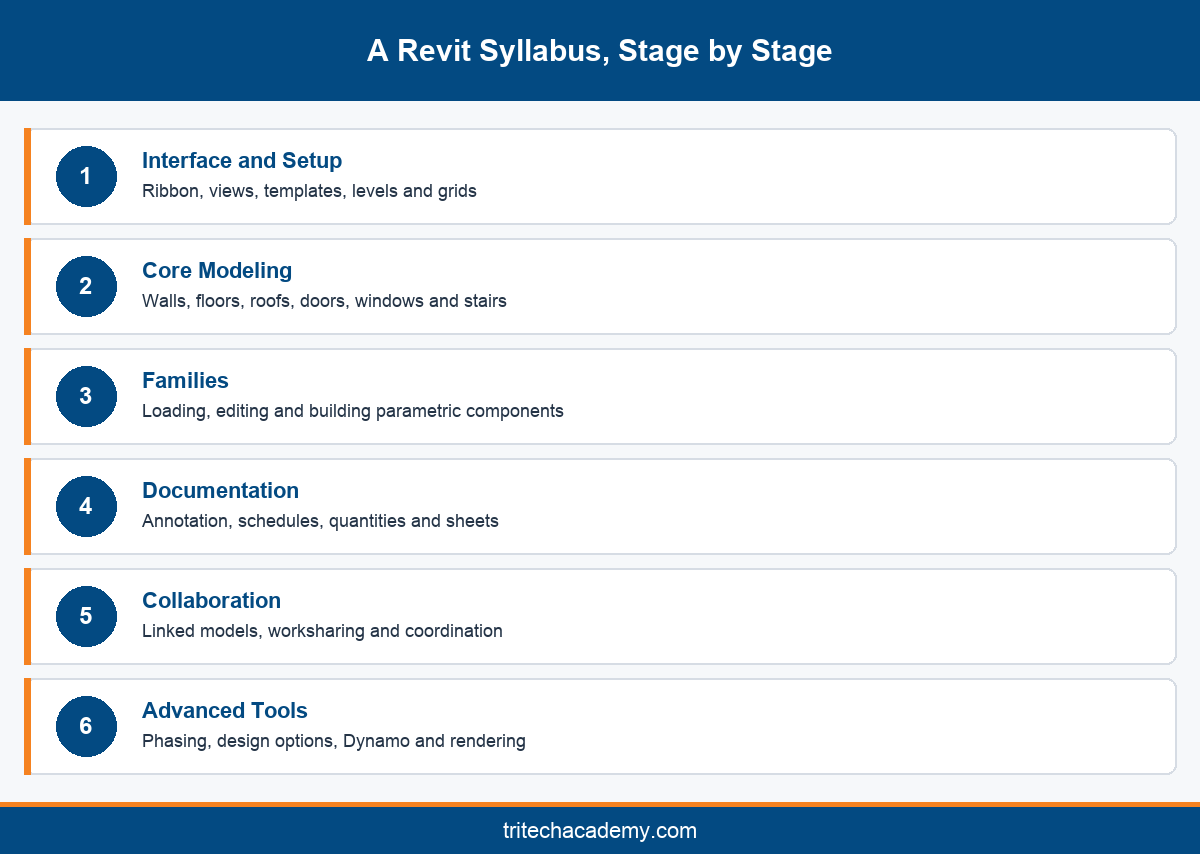
Every good syllabus starts with orientation. In the first Revit classes you learn the ribbon, properties palette, project browser and view controls. This sounds basic, yet students who skip it later waste hours hunting for tools they should be able to reach without thinking.
Project setup follows quickly. You learn to start from a template, set levels and grids, and understand how Revit links every view to one shared model. This is the biggest mental shift for students coming from 2D drafting, where each drawing lives as a separate file.
Basic modeling comes next. Walls, floors, ceilings, doors, windows and roofs make up the first building most learners create. A good trainer insists on correct wall types and level constraints from day one, because sloppy habits here cause errors that surface weeks later.
Views are introduced alongside modeling. Plans, sections, elevations and 3D views are all generated from the same model, and you learn how view templates and visibility settings control what appears on each. Understanding this relationship is what makes Revit feel fast rather than confusing.
At this stage most Revit lessons use a small residential or office building as the practice model. It is simple enough to finish, but realistic enough to show how changes ripple through every view automatically. That moment usually convinces students why the industry has moved to building information modeling rather than separate drawings.
By the end of stage one you should be able to model a complete small building and produce basic plans and sections. If a program cannot get you here quickly, compare it with the curriculum laid out in our guide to curriculum and career paths in BIM.
Families, Annotation and Schedules: The Middle of the Syllabus
Families are the building blocks of every Revit model, and they deserve a full module of their own. You start by loading and placing component families, then learn type and instance parameters, and finally build simple parametric families in the Family Editor yourself.
Family skills separate competent users from beginners. Employers often find that candidates can model walls but freeze when a project needs a custom fixture, a special window or a parametric piece of equipment. Strong Revit training courses treat family creation as a core skill, not an optional extra.
Annotation turns a model into a drawing set. This module covers dimensions, tags, text, keynotes, detail lines and callouts. You also learn how annotation stays linked to model elements, so a tag updates automatically when the element it describes changes.
Schedules and quantities are where Revit starts saving real money on projects. You learn to build door, window, room and material schedules, filter and sort them, and export quantities for estimation. These are the same outputs contractors and consultants rely on during tendering.
Sheets bring everything together. You set up title blocks, place views, manage revisions and prepare drawing sets ready for issue. Practising this on a full project shows how documentation decisions made early either save time or create rework when the design changes.
This middle stage is usually the longest part of the syllabus, and it is where practice on real project drawings matters most. Learning these skills on simplified tutorials leaves gaps that only appear when you face a genuine project with messy, changing information. Ask to see sample sheets produced by past students before you enrol.
Advanced Revit Training: Collaboration, Phasing and Dynamo
Once the foundations are solid, advanced Revit training focuses on how teams work on one model. Worksharing lets several people edit a central model at the same time, and you learn to create worksets, borrow elements and synchronise without overwriting a colleague’s changes.
Linked models are the other half of collaboration. Architects, structural engineers and MEP engineers usually keep separate files, which are linked together for coordination. You learn to manage links, copy and monitor grids and levels, and exchange data through formats like Industry Foundation Classes.
Phasing teaches you to model existing, demolished and new construction in one project. It is essential for renovation and extension work, which forms a large share of projects in growing cities like Kochi. Design options let you test alternative layouts without duplicating the whole model.
Dynamo introduces visual programming. In a short introduction you learn to automate repetitive tasks such as renumbering rooms or placing elements in bulk. Most students will not become Dynamo specialists, but knowing what it can do changes how you approach large, repetitive modeling tasks. Even a few simple scripts can save hours on a large housing or hospital project.
Rendering and visualisation close the advanced stage. You learn materials, lighting, cameras and walkthroughs, so a model can be presented to clients clearly. Architecture students tend to spend more time here, as explained in our guide to the projects you build in a Revit Architecture program.
Engineers from MEP backgrounds take a different advanced path, focusing on systems, analysis and coordination with other disciplines. The Revit tools covered for MEP engineers shows how that branch of the syllabus differs from the architecture route.
Classroom Revit Classes in Kochi vs Online Revit Lessons
Once you know what the syllabus should contain, the next question is format. Classroom Revit classes and online lessons can teach the same topics, but they produce different results for most beginners, especially those learning modeling for the first time.
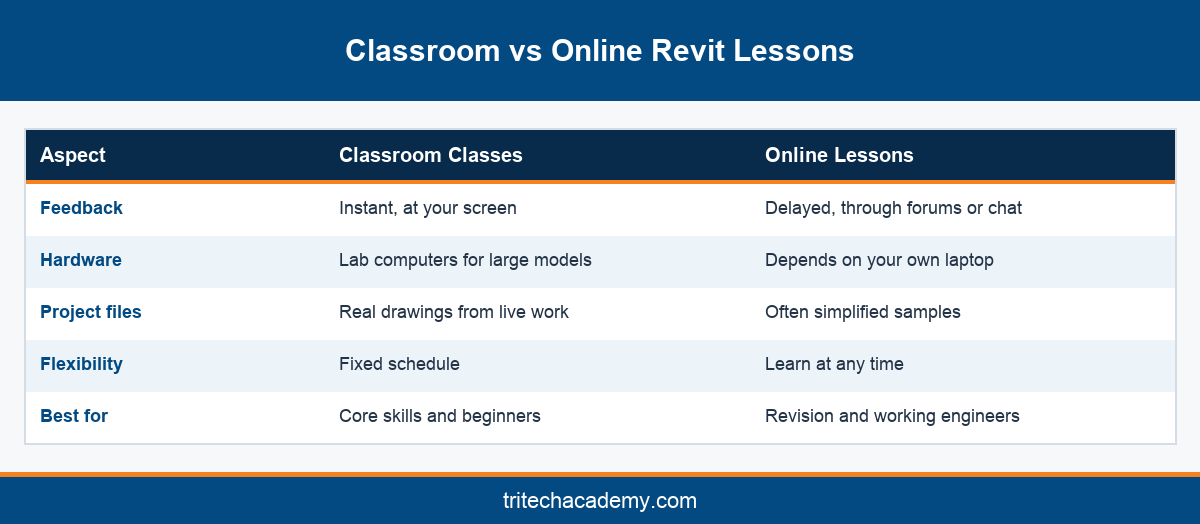
Classroom training gives immediate feedback. When your wall joins break or a family refuses to flex, a trainer can look at your screen and fix the cause in seconds. Online, the same problem often costs an evening of searching forums and rewatching videos.
Lab access also matters. Revit needs a capable computer, and large project files can overwhelm an ordinary laptop. Training in a well equipped lab lets you practise on full project models from day one, without worrying about whether your own hardware can cope.
Online Revit lessons still have real value. They suit working engineers who need flexibility, and they are excellent for revising a specific tool or watching a technique again. Many students combine both, attending classroom sessions for core skills and using online content for revision.
At Tritech Academy, classroom training follows a four step method of Learn, Practice, Develop and Deliver, taught by practicing professionals. Students model from drawings shaped by Tritech Engineering’s 1,000+ projects, which gives classroom practice a realism that generic online tutorials rarely match.
Whatever format you choose, judge a program by the stage it can take you to, not the number of topics it lists. A syllabus is only useful if you finish it able to model, document and coordinate a complete building on your own. Ask every institute to show you a finished student model before you decide.
Conclusion
The best Revit classes follow a clear path: interface and modeling first, then families and documentation, then collaboration and advanced tools. Choose a program that takes you through every stage on real project files, with trainers who can correct mistakes as they happen. To see how Revit fits into Tritech Academy’s wider programs, read the complete guide to Revit at Tritech Academy, then contact the admissions team to discuss the right starting stage for you.
Frequently Asked Questions
What is taught in beginner Revit classes?
Beginner Revit classes cover the interface, project templates, levels and grids, and basic modeling of walls, floors, roofs, doors and windows. They also introduce plans, sections and 3D views, so students understand how one model drives every drawing.
What topics do advanced Revit training courses cover?
Advanced Revit training courses cover worksharing, linked models, phasing, design options, an introduction to Dynamo and rendering. They assume you can already model, build families and produce documentation confidently, so they focus on teamwork, efficiency and presentation.
Why are families so important in a Revit syllabus?
Families are the components every Revit model is built from. Knowing how to edit and create parametric families lets you handle custom fixtures, equipment and details, which is a skill employers specifically test when hiring BIM modelers.
Are online Revit lessons enough to get a job?
Online Revit lessons can build knowledge, but most employers look for project experience and a portfolio. Many students combine online learning for revision with classroom practice on real project files, which builds the confidence interviews and practical tests demand.
Do I need AutoCAD before joining Revit training?
No, Revit training can start without AutoCAD. Familiarity with technical drawings helps, and many engineers already know some AutoCAD. Revit works differently because it builds one model, so beginners often find it intuitive once the basics click.
What computer do I need to practise Revit at home?
Revit runs best on a computer with a strong processor, plenty of memory and a dedicated graphics card. Students who lack this often rely on training lab computers for heavy project files and use their laptops for lighter practice.
Does Revit training include schedules and quantity takeoff?
A complete syllabus should. Schedules let you list doors, windows, rooms and materials directly from the model and export quantities for estimation. These outputs are used daily by consultants and contractors, so they are essential workplace skills.
Is Dynamo part of a standard Revit course?
Many programs include a short Dynamo introduction in the advanced stage. It teaches how visual programming automates repetitive modeling tasks. Few students become specialists, but knowing what Dynamo can do makes you more efficient on large projects.
Where can I see projects built by Revit students in Kerala?
Tritech Academy shares student work, site visits and training activities in its photo gallery of student projects. Reviewing it shows the kind of real project exposure students receive alongside their classroom modeling practice in Kalamassery.