
Choosing a Revit course shapes how quickly you move from drawing lines to building intelligent models that real project teams rely on. This guide explains how the Revit course at Tritech Academy in Kalamassery, Ernakulam is structured, which tools you will use, and how the training connects to careers in design and construction. It builds on our complete guide to BIM at Tritech Academy, because Revit is the modeling engine inside most BIM workflows.
Whether you are a final year student, a fresh graduate, a diploma holder or a working engineer, the sections below show what each stage of Revit training covers. You will also see how discipline tracks, certification and placement support fit together, so you can judge any program against the same checklist.
Key Takeaways
- A strong Revit course moves from interface basics to discipline modeling on real project drawings, then to documentation and coordination.
- Revit training at Tritech Academy is delivered by practicing engineers from parent company Tritech Engineering, which has 30+ years of MEP design experience.
- Architecture, MEP, electrical and civil learners follow different Revit tracks, so pick the one that matches your degree and target role.
- Autodesk Academic Partner status, real project exposure and a placement cell matter more than the software name on a brochure.
Who a Revit Course Is Built For
Revit is now the default authoring tool for building design teams across India and the Gulf. Architects, structural engineers and building services consultants all exchange Revit models rather than loose 2D drawings. That shift means engineering graduates who only know drafting often struggle in their first interview, because firms expect basic modeling skills from day one.
Final year students and fresh graduates form the largest group in most Revit classes. They usually understand engineering theory but have never produced a coordinated model. A structured program gives them a portfolio of project work they can show employers, which carries more weight than a certificate alone during campus and walk in interviews.
Diploma holders in civil, mechanical and electrical engineering benefit just as much. Revit rewards a clear understanding of how buildings are assembled, and diploma learners often bring practical site knowledge. Pairing that knowledge with modeling skills opens roles such as BIM modeler and Revit technician in design consultancies and contracting firms.
Working engineers who already draft in AutoCAD join Revit training to stay relevant as projects move to model based delivery. For them, the value lies in learning parametric families, schedules and coordination rather than basic commands. Many choose a course that fits around office hours so they can apply new skills on live projects immediately.
Architecture graduates form a final group with specific needs. They want to turn design intent into documented models with sheets, sections and material schedules. If that describes you, it helps to review the skills architects should bring before enrolling so the first few modules feel familiar rather than overwhelming.
Whichever group you belong to, the right program should match your discipline and career goal. A civil graduate aiming for structural modeling needs different exercises from an electrical engineer targeting lighting and power design. Before enrolling, list the roles you want to apply for and check that the course builds a portfolio aligned with those roles.
What the Revit Course Curriculum Covers at Tritech Academy
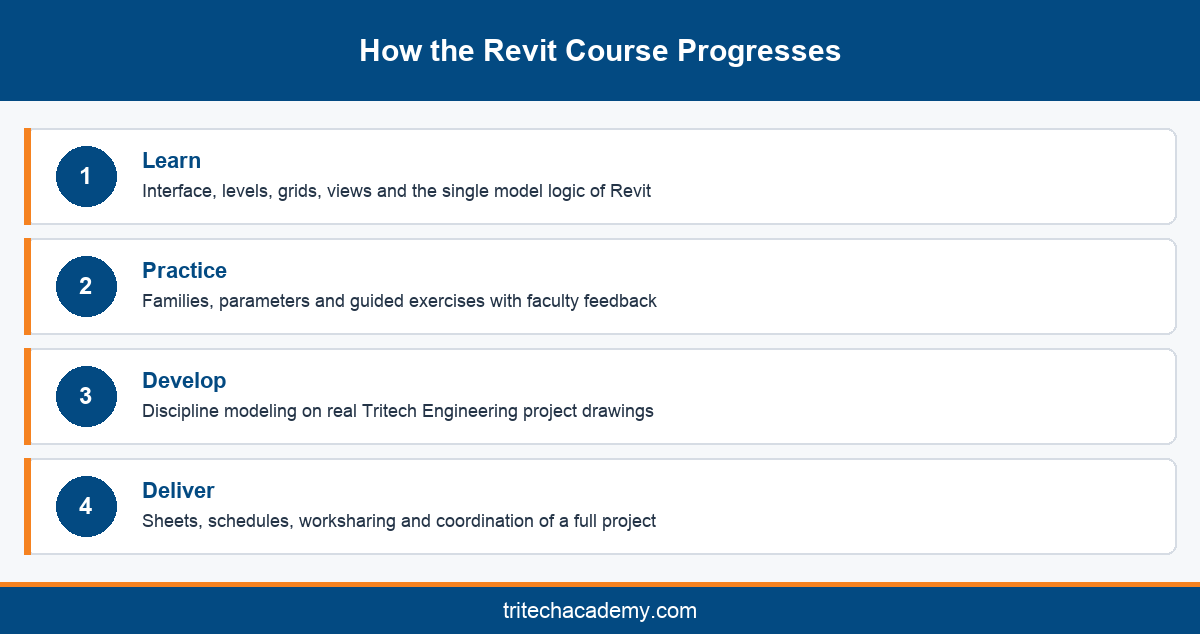
Tritech Academy follows a four step training method of Learn, Practice, Develop and Deliver. In a Revit course, that method translates into three broad stages. Each stage builds on the last, so learners see project complexity grow gradually rather than meeting a complete building model on the first day.
The stages also give learners clear milestones. At the end of each one, faculty review submitted work before the group moves forward. That checkpoint approach suits both classroom learners and working engineers, because nobody progresses to advanced modeling with weak foundations that would slow them down later in the program.
Stage One: Interface, Views and Families
The first stage covers the Revit interface, project templates, levels, grids and views. Learners practise placing walls, floors, doors and windows, then learn how plans, sections and elevations stay linked to one model. Understanding that single model logic early prevents many habits carried over from 2D drafting.
Families are introduced next, because almost everything in Revit is a family. Learners edit system families, load component families and build simple parametric families with type and instance parameters. These skills make later discipline modeling faster, since custom content becomes a routine task rather than a blocker.
Stage Two: Applied Modeling on Real Project Drawings
The second stage moves into discipline modeling using real project drawings from parent company Tritech Engineering. Instead of textbook exercises, learners model buildings that went through actual design and approval cycles. This exposes them to the irregular geometry, revisions and incomplete information that real consultancy work always involves.
Faculty review models at each checkpoint, pointing out errors in levels, phasing or system connections. Learners redo problem areas until the model behaves correctly. That feedback loop, delivered by practicing engineers rather than general software trainers, is the core difference between a project led program and a video based tutorial series.
Stage Three: Documentation, Schedules and Coordination
The final stage focuses on producing deliverables. Learners create sheets, annotate views, generate quantity and equipment schedules, and set up title blocks to office standards. They also learn worksharing basics, so several team members can work on one central model without overwriting each other.
Coordination closes the stage. Learners link models from other disciplines, check clearances and resolve clashes before issuing drawings. They also practise exporting to Industry Foundation Classes for teams that use other software. By the end, each learner holds a documented project that demonstrates complete Revit delivery.
Tools and Software Covered Alongside Revit
Autodesk Revit sits at the centre of the program, but real projects never run on one tool. A complete Revit software course teaches how models move between applications during design, analysis and construction. Tritech Academy names Revit, AutoCAD, BIM Collaborate Pro, DIALux evo and Primavera P6 among the software used in its training.
AutoCAD remains essential for reading legacy drawings, preparing details and working with consultants who still issue 2D files. Learners import CAD drawings into Revit as underlays and convert them into intelligent models. Knowing both tools is why autocad revit courses stay popular with students who want flexibility across different employers.
BIM Collaborate Pro supports cloud based coordination, letting distributed teams share models, track issues and manage design reviews. Learning it alongside Revit prepares graduates for firms that run projects across India and the Gulf from multiple offices. It also introduces the discipline of version control and model ownership that larger projects require.
DIALux evo is used for lighting design and calculation, which links directly to electrical modeling in Revit. Primavera P6 handles project scheduling, giving learners context on how model data feeds construction planning. Together these tools show how a Revit model connects to analysis, scheduling and site execution rather than ending at drawings.
All software practice happens in dedicated software labs on machines configured for model heavy work. That matters because Revit performance on an underpowered laptop can make early learning frustrating. Lab based Revit classes also let faculty watch learners work and correct technique in real time.
Learners should also understand that software skills alone do not make a designer. Tools speed up work, but engineering judgement decides whether a model is correct. That is why tool training at Tritech Academy always runs alongside discipline knowledge, so learners understand both how to model a system and why it is designed that way.
Software versions also matter. Firms usually upgrade Revit over time, and files saved in a newer version cannot open in an older one. Ask any institute which release it trains on, and expect to see current versions on lab machines so your skills transfer cleanly to an employer’s environment.
Revit Specializations by Engineering Discipline
Revit serves every building discipline, but each one uses a different toolset and produces different deliverables. Choosing the right track early keeps your portfolio focused on the roles you want. Tritech Academy offers discipline programs that each place Revit at the centre of the workflow.
Each track still shares the same foundation stage, so learners from different disciplines understand how their models connect. That shared grounding makes coordination far easier later, because an architect, an MEP engineer and a structural engineer all speak the same Revit language when they review a combined model together.
Revit for Architecture
Architecture learners model walls, curtain systems, stairs, roofs and room data, then produce plans, elevations and presentation views. The emphasis is on turning design intent into coordinated documentation. Tritech Academy delivers this through the BIM for Architecture program, which moves designers from traditional drafting into intelligent modeling.
Architecture tracks also cover area plans, material takeoffs and phasing for renovation work. These skills matter in Kerala, where many projects involve extensions or upgrades to existing buildings. Graduates typically target roles as architectural BIM modelers, design coordinators or documentation specialists within architecture and consultancy firms.
Revit for MEP Engineers
MEP learners model duct networks, piping, plumbing fixtures, fire protection systems and equipment, with connectors that carry flow and sizing data. Tritech Academy builds this track into our flagship MEP Integrated BIM program, drawing on Tritech Engineering’s long MEP design practice and live consultancy projects.
The MEP track places heavy weight on coordination, because services compete for the same ceiling space. Learners resolve clashes between ducts, pipes, cable trays and structure before drawings are issued. Mechanical graduates can deepen the HVAC side through the HVAC Systems Engineering program for load and system design.
Revit for Electrical and Civil Engineers
Electrical learners model lighting fixtures, panels, circuits and cable routes, then generate panel schedules and load summaries. Lighting studies in DIALux evo connect naturally to this work. The Electrical Systems Engineering program covers professional electrical design with Revit as the modeling platform.
Civil and structural learners focus on structural framing, foundations, reinforcement views and coordination with architectural models. The BIM for Civil and Structures program builds those skills on real project drawings. Each discipline track leads to its own portfolio, so employers see work that matches the role on offer.
AutoCAD vs Revit: Where Each Fits in Your Training
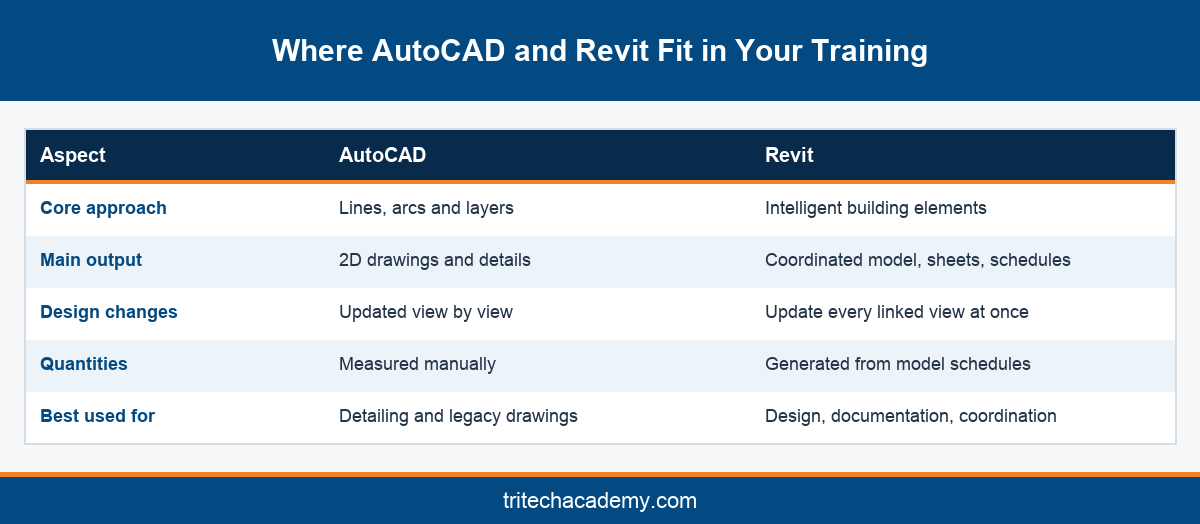
Students often ask whether they should learn AutoCAD before starting a Revit course. AutoCAD is a drafting tool built on lines, arcs and layers, while Revit is a modeling tool built on intelligent building elements. Both appear on job descriptions, but they solve different problems and suit different stages of a project.
AutoCAD remains useful for detailed 2D work, shop drawings and coordination with consultants who have not moved to modeling. Revit is stronger for design development, documentation and coordination, because every change updates every view automatically. Many Indian firms still run both, which is why learners benefit from understanding where each one fits.
For complete beginners, a short grounding in drawing reading and basic drafting helps before Revit. Learners who already know AutoCAD often progress faster in Revit, although they must unlearn the habit of drawing views separately. A good program handles both groups by adjusting early exercises rather than forcing one fixed sequence.
The comparison below summarises the practical differences. It is not a ranking, since most professionals use both tools during their careers. Treat it as a guide to which skills each tool develops, and plan your learning so you can read 2D drawings confidently while building coordinated models in Revit.
In short, AutoCAD teaches precision drafting and drawing literacy, while Revit teaches how buildings and systems fit together. Employers hiring BIM modelers increasingly treat Revit as the core skill and AutoCAD as a supporting one. Learning them together, in that order of priority, gives graduates the widest set of job options.
Students searching for autocad revit courses often worry about time and cost of learning both. A sensible approach is to cover AutoCAD drawing literacy first, then spend most of the training effort on Revit modeling and documentation. That balance reflects what design firms actually assess when they shortlist candidates for modeling roles today.
Autodesk Partner Training and Certification
Tritech Academy has been an Autodesk Academic Partner for 16 years, and the website also describes it as an Autodesk Authorized Training Center. That status means training follows Autodesk aligned content and is delivered by trainers who work closely with the software. It also gives learners a recognised route toward Autodesk certification.
Certification is often misunderstood. A course completion certificate shows you attended a program, while an Autodesk certification shows you passed an exam set by Autodesk. Both have value, but employers treat them differently. Our earlier article explains why Autodesk partner status matters for certification in more detail.
Autodesk runs its own certification program with user and professional levels for Revit across architecture, structure and MEP disciplines. Exam formats, eligibility and recommended experience are set by Autodesk and change over time, so always check the current requirements directly before you plan an exam date.
A partner led program prepares you for certification by covering the tasks those exams test, from modeling and families to documentation and collaboration. More importantly, the same skills appear in interviews and practical tests set by employers. Certification then becomes a confirmation of ability you have already proven on project work.
When comparing Revit training providers, ask whether the institute is an authorised Autodesk partner, which software versions it teaches on, and whether certification preparation is part of the program. Those three answers tell you more about training quality than any brochure claim about job titles or salaries.
Certification also signals commitment when you apply abroad. Gulf consultancies and contractors often list Autodesk credentials in job descriptions for BIM roles. Combined with a portfolio of real project models, a recognised certification helps your profile stand out among applicants who list Revit only as a skill on their resume.
Why Tritech Engineering’s Project Experience Shapes the Training
Most Revit training institutes are training businesses first. Tritech Academy is backed by Tritech Engineering, an MEP design consultancy with 30+ years of practice, 200+ million sq ft designed and 1,000+ engineering projects completed. You can explore Tritech Engineering’s project portfolio to see the kind of work behind the training material.
That background changes what happens in class. Faculty are practicing industry professionals, so examples come from buildings they have designed and coordinated. When learners ask why a duct is routed a certain way or why a family needs a specific parameter, the answer comes from real consultancy decisions rather than a manual.
Real project drawings also expose learners to the messy side of practice. Drawings arrive with revisions, missing dimensions and conflicting information between disciplines. Working through those problems in training builds the judgement employers want, and it reduces the shock many graduates feel in their first months at a design firm.
The parent company link also creates internship opportunities on ongoing projects. Learners who complete coursework can gain exposure to live consultancy work, applying Revit skills under supervision. That experience sits alongside the theory and lab practice described in the academy’s history and approach, and it strengthens every portfolio.
With 4,500+ engineers trained and a global alumni network of 4,000+ professionals, the academy has a long record of preparing engineers for design roles. Alumni working in India and abroad also become a useful network when learners start searching for jobs or want advice on specialisation choices.
For learners, the practical result is training that mirrors working life. You learn to read a consultant brief, interpret revisions, follow drawing standards and meet deadlines, not only to operate software. Those habits transfer to any employer, which is why project led training continues to be valued by firms hiring fresh engineers.
Placement Support and Careers After a Revit Course
Completing a Revit course is the start of a career path rather than the end of learning. Tritech Academy supports learners through its dedicated placement cell, which helps with job readiness, interview preparation and connections to employers in design and construction. Strong portfolios built during training make that process far more effective.
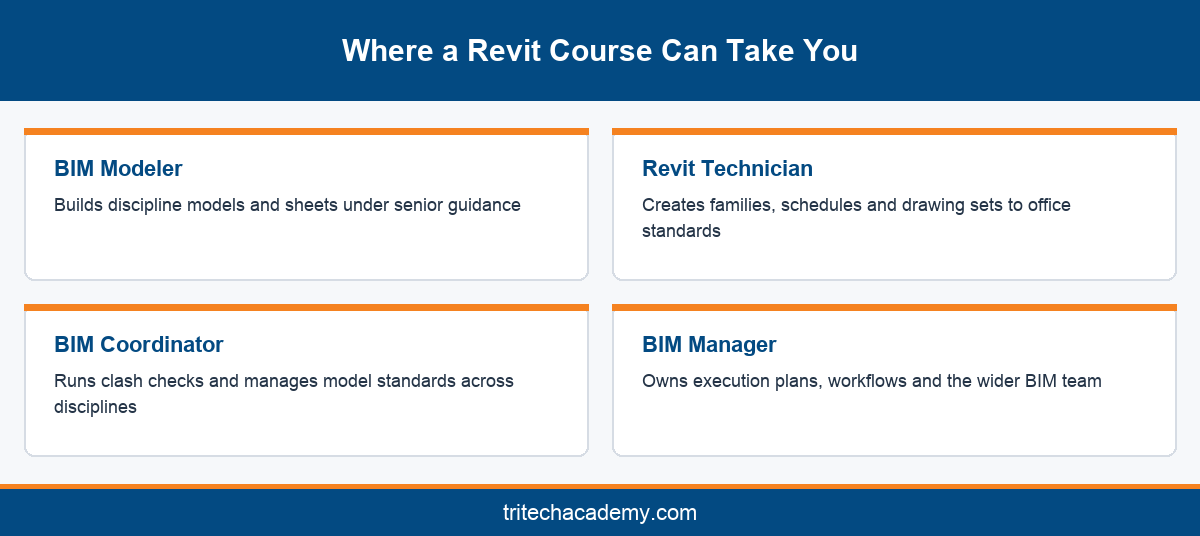
Most graduates start as BIM modelers or Revit technicians, building discipline models under the guidance of senior staff. With experience, they move into BIM coordinator roles, managing clashes and model standards across disciplines. Senior modelers and BIM managers sit further along the path, owning execution plans and team workflows.
Employers include architecture practices, MEP consultancies, structural firms, contractors and BIM outsourcing companies. Kerala has a growing base of such firms, and Kochi in particular hosts design teams serving Indian and international projects. The Gulf region also continues to recruit Revit skilled engineers from India for consultancy and contracting roles.
Interviews for these roles usually include a practical modeling test. Candidates may be asked to model part of a building, create a family or fix errors in an existing model. Learners who have completed real project work during training tend to handle these tests calmly because the tasks feel familiar.
Continued learning matters after placement. Software evolves, and firms adopt new standards for model delivery. Graduates who keep building skills in coordination, automation with tools such as Dynamo and project management move toward senior roles faster. A good Revit course gives you the foundation and the habits to keep growing.
Before you finish training, update your portfolio with your strongest project sheets, families and coordination reports. Prepare to explain your modeling decisions clearly, because interviewers often ask why you chose a method. Learners who can talk through their work confidently convert interviews into offers far more often than those who only list software names.
Conclusion
A Revit course is worth the time when it moves you from interface basics to documented, coordinated project models that employers can see. At Tritech Academy, that journey runs on real Tritech Engineering drawings, discipline tracks for architecture, MEP, electrical and civil learners, and 16 years of Autodesk partner training. Placement support then helps turn your portfolio into a first role.
If you are ready to compare programs or choose a discipline track, speak with the admissions team to discuss your background and goals. You can start your Revit journey in Kalamassery with training built around how real projects work.
Frequently Asked Questions
What does a Revit course at Tritech Academy include?
The program covers the Revit interface, families, discipline modeling on real Tritech Engineering project drawings, documentation and coordination. Learners also work with supporting tools such as AutoCAD and BIM Collaborate Pro, and finish with a documented project for their portfolio.
Who should join Revit training?
Final year engineering students, fresh graduates, diploma holders and working engineers in architecture, civil, mechanical and electrical disciplines all benefit. Anyone who wants to move from 2D drafting into model based design and coordination roles will find Revit training valuable.
Do I need AutoCAD experience before starting Revit classes?
No, AutoCAD experience is helpful but not essential. Basic drawing reading skills make early lessons easier. Learners who already know AutoCAD often move faster, though they must adjust to thinking in models rather than separate drawings and views.
Is Revit useful for MEP and electrical engineers?
Yes. Revit includes dedicated tools for ducts, piping, plumbing, fire protection, lighting, panels and circuits. MEP and electrical engineers use it to model systems, size components, generate schedules and coordinate services with architectural and structural models before construction.
Does Tritech Academy prepare learners for Autodesk certification?
As an Autodesk Academic Partner for 16 years, the academy aligns training with Autodesk content and the skills its exams test. Exam formats and eligibility are set by Autodesk, so learners should confirm current requirements directly before booking an exam.
What jobs can I get after completing Revit training?
Common starting roles include BIM modeler and Revit technician in architecture practices, MEP consultancies, structural firms and contractors. With experience, professionals progress to BIM coordinator, senior modeler and BIM manager roles across India and the Gulf region.
How is a Revit software course different from video tutorials?
Tutorials teach commands in isolation. A structured program adds faculty feedback, real project drawings, coordination exercises and documentation standards. That combination builds the judgement employers test in practical interviews, which videos alone rarely develop for learners starting out.
Can I combine Revit training with an internship?
Yes. Learners who complete coursework can gain exposure to ongoing Tritech Engineering projects. For example, the internship program for HVAC engineers lets mechanical learners apply modeling and design skills on live consultancy work under supervision.
Where does Revit fit in a long term BIM career?
Revit is usually the first core skill, followed by coordination, standards and team leadership. Many professionals later move into management roles. Our article on the BIM manager career path explains how those stages typically progress over time.