
Autodesk Revit training means very little to an employer until you can show proof of skill. That proof usually takes the form of an Autodesk certification, yet most students do not know which level or track they should target. This guide breaks the certification down into its levels, its discipline tracks and the kind of skills each exam measures. It also explains how training at an Autodesk Academic Partner like Tritech Academy in Kalamassery prepares you, and why a course certificate and an Autodesk credential are not the same thing.
Key Takeaways
- Autodesk certifies Revit skills at two main levels, Certified User for beginners and Certified Professional for working modelers.
- Revit professional certification is split by discipline, so architects, structural engineers and MEP engineers sit different exams.
- Good Autodesk Revit training builds exam readiness through real project modeling, not memorised menu clicks.
Autodesk Revit Training and the Two Certification Levels
Autodesk organises its Revit credentials into levels so that a beginner and an experienced modeler are not judged by the same yardstick. Understanding the levels first helps you plan your Autodesk Revit training around a realistic target instead of guessing which exam to book.
The entry level is Autodesk Certified User. It checks whether you understand the interface of Autodesk Revit, can create basic building elements, place views on sheets and produce simple documentation. Students and fresh graduates usually aim for this level after completing a foundation course and a few guided modeling exercises.
The higher level is Autodesk Certified Professional. It assumes you already work with Revit regularly and tests whether you can solve practical modeling problems quickly. Questions are built around tasks a working engineer or architect faces on a live project, such as managing families, views and coordination.
The gap between the two levels is not only difficulty. A Certified User exam rewards knowing where tools live. A professional exam rewards judgement, such as choosing the right workflow, fixing a broken model and keeping documentation consistent when the design changes late in a project.
Because Autodesk updates its exam objectives over time, the details of each level can change. Always check the current exam guide on Autodesk’s certification site before you book, and confirm that the objectives your training covers match the exact version you plan to sit.
For most learners in Kerala, the sensible route is to earn practical modeling confidence first, then attempt the level that matches your actual experience. Rushing straight to the professional exam without project work is the most common reason candidates struggle. Project work also gives you files to revise from in the final weeks before the exam.
Revit Professional Certification Tracks by Discipline
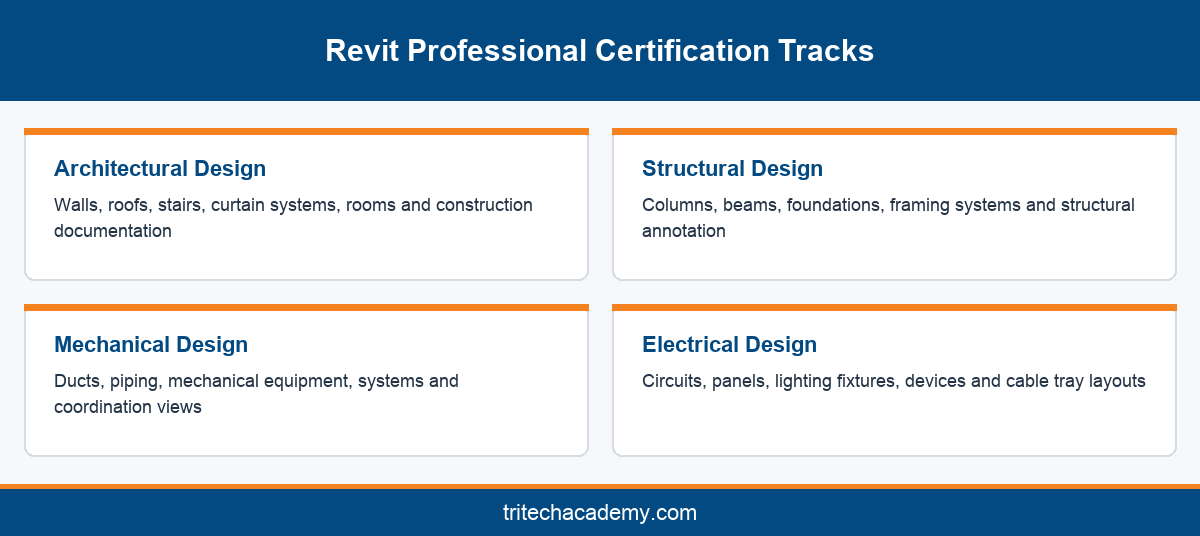
At the professional level, Revit certification is not a single exam. Autodesk offers separate tracks for architectural design, structural design, mechanical design and electrical design, each focused on the elements and workflows that discipline uses every day.
The architectural track concentrates on walls, floors, roofs, stairs, curtain systems, rooms and the documentation an architect issues. If your Autodesk Revit course followed an architecture syllabus, this is the natural track, and our guide to what you design in a Revit Architecture program shows the typical deliverables.
The structural track covers columns, beams, foundations, framing systems and structural annotation. Civil and structural graduates usually pick it after modeling a few complete frames. It rewards a clean understanding of how analytical and physical structural models relate to each other.
Mechanical and electrical tracks together form what many students call Revit MEP certification. The mechanical exam focuses on ducts, piping, equipment and systems. The electrical exam focuses on circuits, panels, lighting, devices and cable trays. Our breakdown of Revit for MEP engineers explains the tools both tracks share.
Choosing a track should follow your career plan, not the exam that looks easiest. An HVAC engineer who certifies in architectural design gains little credibility with an MEP consultancy, while a certificate in the mechanical track speaks directly to the work that employer hires for.
Some professionals eventually hold more than one discipline credential, especially those moving into BIM coordination roles. That breadth helps, but it is best built in sequence, one track at a time, each backed by real models you can show in an interview. Keep a short log of the models you build for each track, because interviewers often ask you to walk through one.
What the Exam Domains Look Like in Practice
Every Revit exam is built from objective domains, which are groups of skills the exam samples from. The exact wording changes between versions, but the domains tend to fall into a handful of familiar areas that any serious training program should cover in depth.
The first area is model setup and management. This includes starting from templates, setting levels and grids, linking files, managing worksets and keeping the project browser organised. Candidates who skip this foundation often lose time on simple questions during the exam.
The second area is modeling elements and families. You are expected to create and modify system families, load and edit component families, and adjust parameters correctly. Family editing is where many self taught users show gaps, because tutorials rarely cover it properly.
The third area is views, annotation and documentation. Expect tasks on sections, elevations, callouts, tags, dimensions, schedules and sheet setup. These skills decide whether your model becomes a usable drawing set, which is exactly what an employer pays for.
The fourth area is coordination and analysis. Depending on the track, this may involve clash awareness, systems checks, structural connections or lighting and circuiting logic. It mirrors the coordination work covered in the wider BIM certification guide on our blog.
Read each domain as a checklist rather than a syllabus to memorise. If you can perform every listed task on a real project model without notes, you are ready. If you can only describe the steps, you need more modeling practice first. Ask your trainer to set timed tasks from each domain so weak areas show up early.
How Autodesk Revit Training at an Academic Partner Prepares You
Where you train shapes how ready you feel on exam day. Tritech Academy has been an Autodesk Academic Partner for 16 years, and the site also describes it as an Autodesk Authorized Training Center. That status means training follows Autodesk aligned content and licensed software in the labs.
The bigger advantage is project exposure. Tritech Academy is backed by Tritech Engineering, which brings 30+ years of MEP design experience, 200+ million sq. ft. designed and 1,000+ engineering projects. Students model from drawings shaped by that real work rather than from simplified textbook examples.
The training method follows four steps: Learn, Practice, Develop and Deliver. You learn fundamentals, practise through guided exercises, develop skills on professional software, then deliver an industry ready project. Each step maps neatly onto the exam domains described above.
Faculty are practicing professionals, so mock tasks reflect the problems you will actually meet at work. That matters because certification questions increasingly test judgement. A trainer who coordinates models for a living can explain why a workflow is right, not just which button to press.
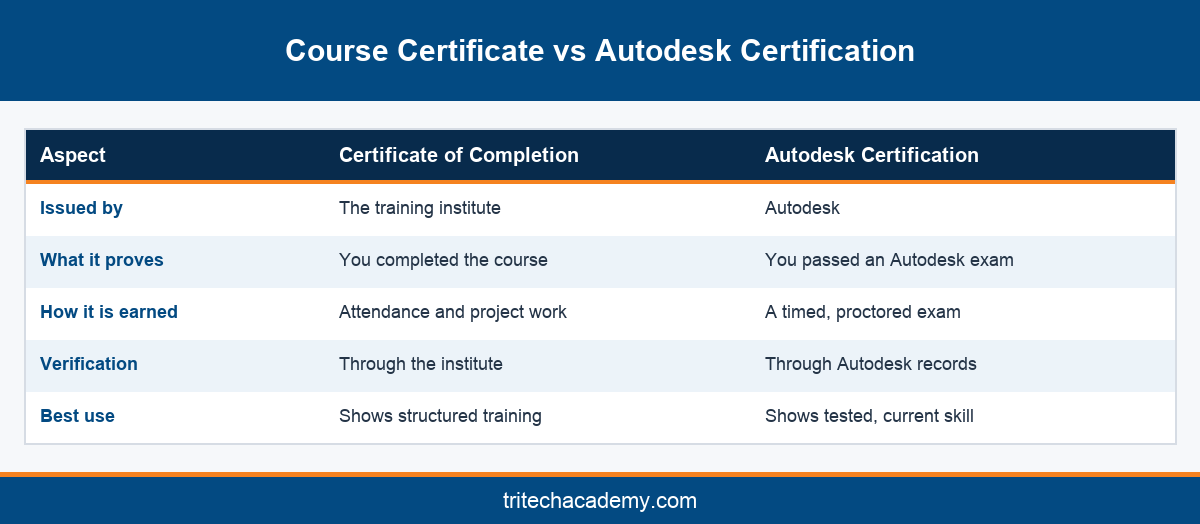
A certificate of completion from a training institute and an Autodesk certification are different credentials. The first proves you finished a course. The second proves you passed an exam set by Autodesk. Employers value both, but the Autodesk credential is the one any recruiter can verify independently.
If you want to compare program options before deciding, the full Revit pillar guide explains how Revit sits within Tritech’s wider course catalogue and placement support. It is the best starting point before you contact the admissions team.
Conclusion
Autodesk Revit training pays off when it ends in a credential that matches your discipline and level. Start with the Certified User exam if you are new, move to the professional track that fits your career, and back every exam with real project models. Tritech Academy combines 16 years as an Autodesk Academic Partner with project experience from Tritech Engineering. To plan your certification path, speak with the Tritech Academy admissions team and ask which track suits your engineering background.
Frequently Asked Questions
What does Autodesk Revit training cover for certification?
It covers model setup, element and family modeling, views, annotation, schedules, sheets and coordination tasks. Good training then adds discipline specific work, such as architectural documentation or MEP systems, so you can perform each exam objective on a real project model.
What is the difference between Autodesk Certified User and Certified Professional?
Certified User checks foundational knowledge of the Revit interface and basic modeling. Certified Professional assumes regular use and tests practical problem solving on realistic tasks. Beginners usually start with the user level and move up after gaining project experience.
Is there a separate Revit MEP certification?
Autodesk offers separate professional exams for mechanical design and electrical design, which together are often called Revit MEP certification. Engineers usually choose the track that matches their discipline, then add the other later if their role expands.
Which Revit professional certification should a civil engineer choose?
Most civil and structural engineers choose the structural design track, because it tests columns, beams, foundations and framing. It aligns with the models those engineers build at work and with the roles consultancies hire them for after training.
Does an Autodesk Revit course certificate count as Autodesk certification?
No. A course certificate shows you completed a training program. Autodesk certification is awarded only after you pass an official Autodesk exam. Many students earn both, using the course to build the skills the exam then verifies.
How do I know which exam version to prepare for?
Autodesk updates its exam objectives over time, so always check the current exam guide on Autodesk’s site before booking. Then confirm with your trainer that the course content covers every objective listed for that specific exam version.
Why train at an Autodesk Academic Partner?
An Autodesk Academic Partner trains on licensed software with Autodesk aligned content. At Tritech Academy, that is combined with real project drawings from Tritech Engineering, so students practise the same tasks certification exams and employers expect.
Do employers in India ask for Revit certification?
Many employers value it, especially for BIM modeler and coordinator roles, because it is independently verifiable. A strong project portfolio still matters, so it helps to pair certification with models built during internships on ongoing projects.
Can I prepare for Revit certification while still studying engineering?
Yes. Many final year students and diploma holders prepare alongside their studies. Starting with foundation modeling, then practising exam style tasks on project files, lets you aim for the Certified User level before graduation and progress afterwards.