
A Revit MEP course should take an engineer from an empty architectural model to a coordinated set of building services drawings. Many short webinars cover one tool, such as duct routing, and leave the rest unexplained. This breakdown walks through every module a complete program should include: HVAC, electrical, plumbing, fire protection, analysis, coordination and documentation. It uses the MEP Integrated BIM program at Tritech Academy as the reference, built on the design practice of parent company Tritech Engineering and its 30+ years of MEP work.
Key Takeaways
- A complete Revit MEP course covers HVAC, electrical, plumbing and fire protection inside one coordinated model, not as separate tutorials.
- Revit MEP training should include system logic, load analysis and clash checks, because drawing pipes alone does not make a working design.
- Engineers who finish with a coordinated sheet set are ready for BIM modeler and MEP coordinator roles in consultancies.
What a Revit MEP Course Should Cover
Revit once came in separate editions for architecture, structure and MEP. Today Revit ships as one product with MEP toolsets built in, so a mechanical or electrical engineer works in the same environment as the architect. A good Revit MEP course starts by explaining that shared model logic.
The first module links the architectural model and sets up the MEP project. Students copy levels, create views for each discipline and learn worksets, so several engineers can work on one building at the same time without overwriting each other’s changes. They also organise the project browser so large models stay easy to navigate.
Next come systems. In Revit, ducts, pipes and circuits are not just geometry. They belong to systems with flow, pressure and electrical properties. Understanding the System Browser early helps students trace every air terminal back to its air handling unit and every outlet back to its panel.
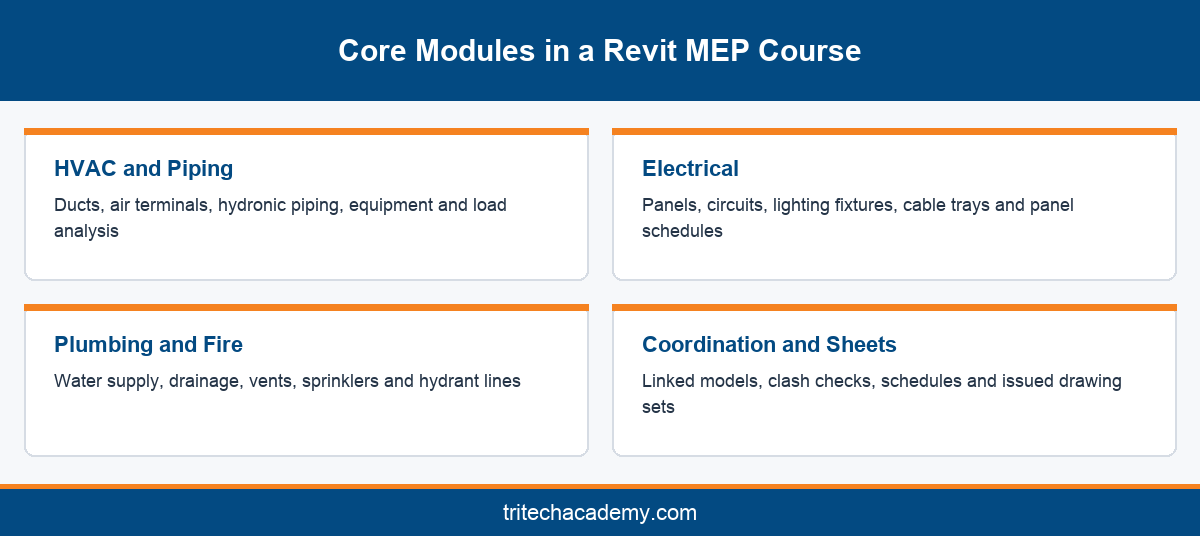
A complete program then splits into discipline modules. Mechanical engineers spend more time on HVAC and piping, electrical engineers on power and lighting, and graduates heading into public health engineering on plumbing and fire protection. Everyone still learns enough of each discipline to coordinate.
This is the main gap in a single topic session. Learning duct routing in isolation teaches a skill, but not how that duct competes for ceiling space with cable trays, sprinkler pipes and beams. Real projects demand all four at once, which is why a serious bim mep course treats coordination as a core subject.
Tritech Academy’s MEP Integrated BIM program is built around that reality. Training follows a Learn, Practice, Develop and Deliver method, and faculty who design live projects at Tritech Engineering set the exercises that students model in the lab.
HVAC Ducts, Piping and Load Analysis in Revit
HVAC is usually the heaviest module in any Revit MEP training plan. Students place air terminals, define supply, return and exhaust systems, and route ducts using routing preferences that control fittings, sizes and connections. Automatic routing helps, but manual layout builds better judgement about space.
Duct sizing ties into engineering principles. Revit can size ducts by velocity or friction, and a good instructor explains when each method suits a project. Engineers who already know the fundamentals published by bodies like ASHRAE find this module much easier to connect with real design.
Hydronic piping follows the same pattern. Chilled water, condenser water and hot water systems are modeled with pipe types, slopes and fittings. Students learn to connect equipment such as chillers, pumps and fan coil units so that each system shows correct flow direction. They also add insulation and check that every pipe connects cleanly to its equipment.
Spaces and zones come next, because load analysis depends on them. Students place spaces in every room, group them into zones and run heating and cooling load calculations inside Revit. The results support early equipment sizing and show why a design needs the airflow it does.
Mechanical equipment families matter too. Air handling units, fans and diffusers come from manufacturers as families with connectors and performance data. Learning to load, edit and connect these families is a daily task in any consultancy that designs commercial buildings, hospitals or airports.
Mechanical engineers who want deeper design theory alongside the software can pair this module with the HVAC Systems Engineering program, which focuses on calculation and system selection before any modeling begins.
Electrical, Plumbing and Fire Protection Modeling
The electrical module starts with panels, distribution boards and circuits. Students place electrical equipment, assign voltages and build circuits that connect lighting fixtures, power outlets and devices back to the correct panel. Panel schedules then generate automatically from that circuit data.
Lighting design adds another layer. Revit handles fixture placement, switching and circuiting, while many offices use specialist tools such as DIALux evo for lighting calculations. A balanced course shows how the two connect rather than pretending one tool does everything. Students also learn to tag fixtures and build lighting schedules directly from the model.
Cable trays and conduits complete the electrical model. These are the elements that most often clash with ducts and pipes in a crowded ceiling, so modeling them accurately matters. Students learn tray sizing, fittings and clear zones for maintenance access. Good courses also cover hangers and supports, since they claim ceiling space too.
Plumbing covers domestic water, drainage and vent systems. Students model fixtures, set pipe slopes for gravity drainage and connect risers through every floor. This part of the wider building services discipline is often underestimated, yet it drives shaft sizes and floor penetrations.
Fire protection modeling follows codes. Sprinkler layouts, hydrant lines and hose reel systems are modeled with spacing rules drawn from standards such as those maintained by NFPA and the National Building Code of India. Students learn to check coverage and route mains around structure.
Engineers who want this discipline in depth can explore the plumbing and fire protection track at Tritech. Inside a full MEP program, the goal is fluency: enough knowledge to model, coordinate and document plumbing and fire systems alongside everything else.
Coordination, Schedules and Sheets: Finishing the Course
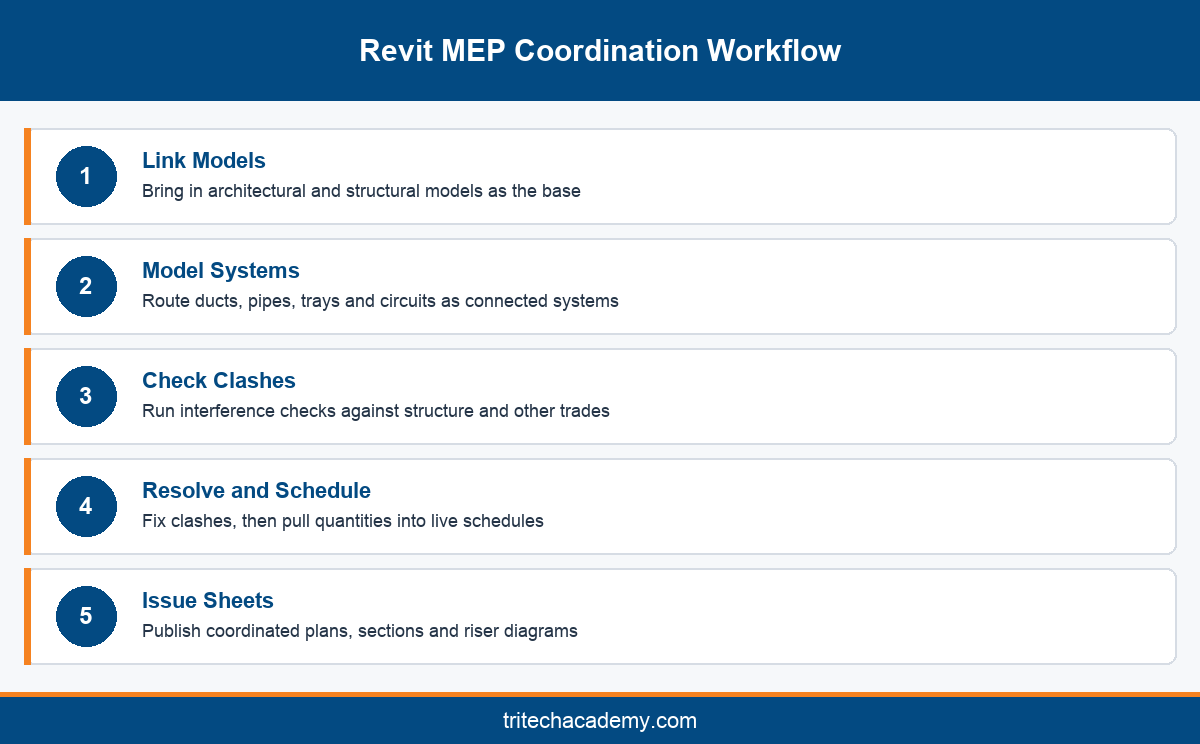
Coordination is where a Revit MEP course proves its value. Students link architectural and structural models, then check their services against beams, columns and ceilings. Interference checks inside Revit flag clashes early, before they reach site as expensive rework.
Larger projects move coordination into dedicated platforms. Tools such as BIM Collaborate Pro let several firms share models in the cloud, review issues and track who resolves each clash. Learning the workflow matters more than memorising one tool’s menus. Students practise raising, assigning and closing issues just as a project team would.
Schedules turn the model into quantities. Duct and pipe schedules, equipment lists, lighting fixture counts and panel schedules all pull live data from the model. Contractors use these numbers for procurement, so accuracy here has direct cost consequences on site.
Documentation finishes the module. Students set up view templates for each discipline, add tags, dimensions and legends, and place everything on titled sheets. A coordinated MEP sheet set with plans, sections and riser diagrams is the strongest portfolio piece an engineer can show.
Revit MEP classes that stop before this stage leave students able to draw but not deliver. Employers notice the difference quickly, because a modeler who can issue clean, coordinated sheets saves a senior engineer hours of checking every single week.
For a broader view of how MEP fits with architecture and structure, see our complete guide to Revit training at Tritech. Engineers who want to understand the architectural model they coordinate with can also read about what architecture students design and build in Revit.
Conclusion
A complete Revit MEP course covers far more than drawing ducts. It builds system logic, load analysis, electrical circuiting, plumbing, fire protection, coordination and a finished sheet set inside one shared model. Judge any program by whether you leave able to deliver all of that. Tritech Academy teaches it through the MEP Integrated BIM program, drawing on 200+ million sq ft designed by Tritech Engineering. To plan your next step, talk to the Tritech admissions team. Bring your questions about discipline, background and career goals, and the team will suggest the right track.
Frequently Asked Questions
What does a Revit MEP course cover?
A complete course covers HVAC ducts and piping, electrical circuits and lighting, plumbing, fire protection, load analysis, clash checks, schedules and sheets. All of it happens inside one coordinated model linked to the architectural and structural designs.
Is Revit MEP still a separate software?
No. Revit now ships as one product that includes architecture, structure and MEP toolsets. Engineers use the same application as architects, which makes linking models and coordinating services far simpler than when the editions were sold separately.
Who should join Revit MEP training?
Mechanical, electrical and civil engineering graduates, diploma holders and working engineers in building services benefit most. Final year students also join to build practical skills before placements. Basic knowledge of engineering drawings helps you settle in quickly.
Can Revit calculate heating and cooling loads?
Yes. After you place spaces and zones, Revit can run heating and cooling load calculations using building and weather data. Results support early equipment sizing, though consultants usually confirm final designs with dedicated analysis software and engineering judgement.
Do electrical engineers need to learn Revit?
Increasingly, yes. Consultancies and contractors expect electrical drawings to come from coordinated models. Revit lets electrical engineers place panels, build circuits, generate panel schedules automatically and check cable trays against ducts and pipes before construction begins.
What is clash detection in Revit MEP?
Clash detection finds places where services collide with structure or with each other, such as a duct passing through a beam. Revit runs interference checks inside the model, and larger teams use coordination platforms to track and resolve each issue.
What jobs follow a Revit MEP course?
Typical entry roles include MEP BIM modeler, Revit MEP technician and junior MEP designer in consultancies and contracting firms. With project experience, many move into MEP coordinator roles. Tritech Academy supports this through its placement cell.
Why does Tritech Engineering matter to MEP students?
Tritech Engineering, the parent company of Tritech Academy, brings 30+ years of MEP design and 1,000+ completed projects. Students model from real project drawings, and you can see the record on the Tritech achievements page.
Is online Revit MEP training enough to get hired?
Online lessons can teach the tools, but employers look for coordinated project work. Training with live feedback, lab access and real drawings usually produces a stronger portfolio, which matters more in interviews than a certificate from a short course.