Choosing between AutoCAD and Revit courses is one of the first real decisions an engineering student faces after deciding to learn design software. Both tools come from Autodesk, both appear in job listings and both promise career value, but they solve different problems. This guide compares them in plain terms and then answers the question by discipline, so a civil, mechanical, electrical or architecture student can decide what to learn first. It draws on how Tritech Academy, an Autodesk Academic Partner for 16 years, sequences the two tools in its own training.
Key Takeaways
- AutoCAD teaches precise 2D drafting, while Revit builds intelligent 3D models that generate drawings, schedules and quantities automatically.
- Most engineering students benefit from short AutoCAD fundamentals first, then a deeper move into Revit for BIM work.
- The best AutoCAD and Revit courses teach both tools on one real project, so each skill reinforces the other.
How AutoCAD and Revit Differ in Daily Work
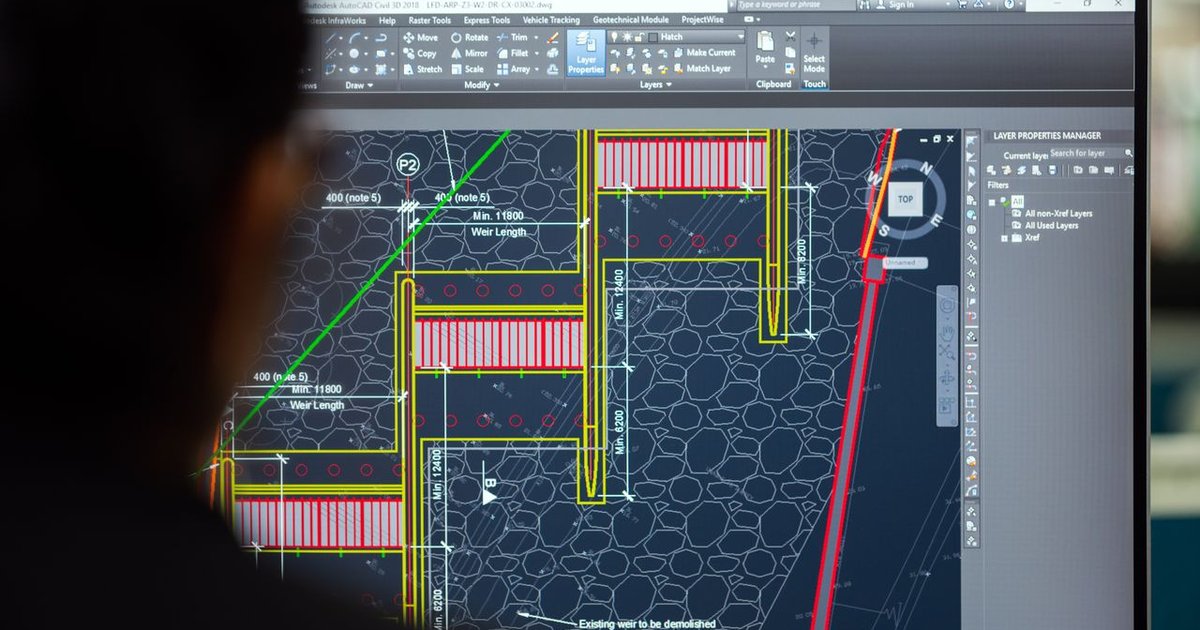
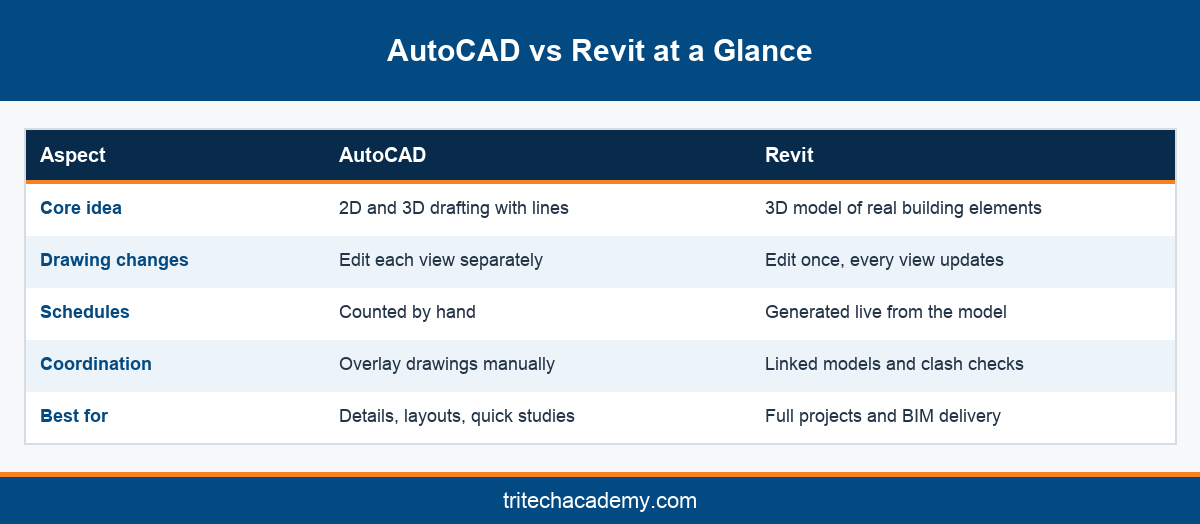
AutoCAD is a general drafting tool. You draw lines, arcs and blocks, and the software stores them as geometry. It works for almost any discipline, from road layouts to electrical single line diagrams, which is why it has been the default design tool in Indian engineering offices for decades.
Revit works differently. You do not draw a wall; you place a wall object that knows its height, layers and material. Plans, sections, elevations and schedules all come from that one model. Change the model and every view updates on its own.
This difference shapes daily work. In AutoCAD, revising a door position means editing the plan, the elevation, the section and the door schedule separately. In Revit, you move the door once. On a large hospital or mall project, that saves days of correction across a full drawing set.
AutoCAD still wins for speed on small or purely 2D tasks. Site sketches, shop drawing markups, standard details and quick layout studies are often faster to produce in AutoCAD, and many consultants and clients still exchange DWG files as their common format.
Revit wins whenever coordination matters. Because every discipline works on linked models, clashes between ducts, beams and cable trays appear on screen long before they appear on site. That is the core promise of BIM and the reason large projects now specify Revit deliverables in their contracts.
In short, AutoCAD is a drawing tool and Revit is a modeling tool. Neither replaces the other entirely, which is why most employers in Kochi, Bengaluru and the Gulf ask for familiarity with both on the same CV, even for entry level roles.
Which to Learn First, Discipline by Discipline
The right order depends less on the software and more on the work you plan to do. A road design engineer and a building services engineer use these tools in very different proportions, so a single answer for every student is misleading. The sections below give a practical starting order for each of the four main engineering streams.
Civil engineers working on roads, drainage and site layouts still rely heavily on AutoCAD and related civil tools. Those heading into buildings should add Revit early, since structural models now drive coordination. Tritech’s BIM for Civil and Structures program follows that building focused route.
Mechanical engineers aiming for HVAC and plumbing design should learn AutoCAD basics briefly and then move to Revit quickly. Duct and pipe routing, equipment placement and load analysis all happen in the model, and most consultancies now issue mechanical drawings directly from Revit.
Electrical engineers often meet AutoCAD first through single line diagrams and schematic work, which remain 2D tasks. Building electrical design, however, needs Revit for lighting layouts, circuiting and cable tray coordination. The Electrical Systems Engineering program combines both, alongside lighting tools such as DIALux evo.
Architecture students gain the most from early Revit exposure. Design development, documentation and presentation all happen inside the model, and studios expect fresh graduates to produce sheets from Revit. AutoCAD remains useful for quick details and for reading drawings from older consultants.
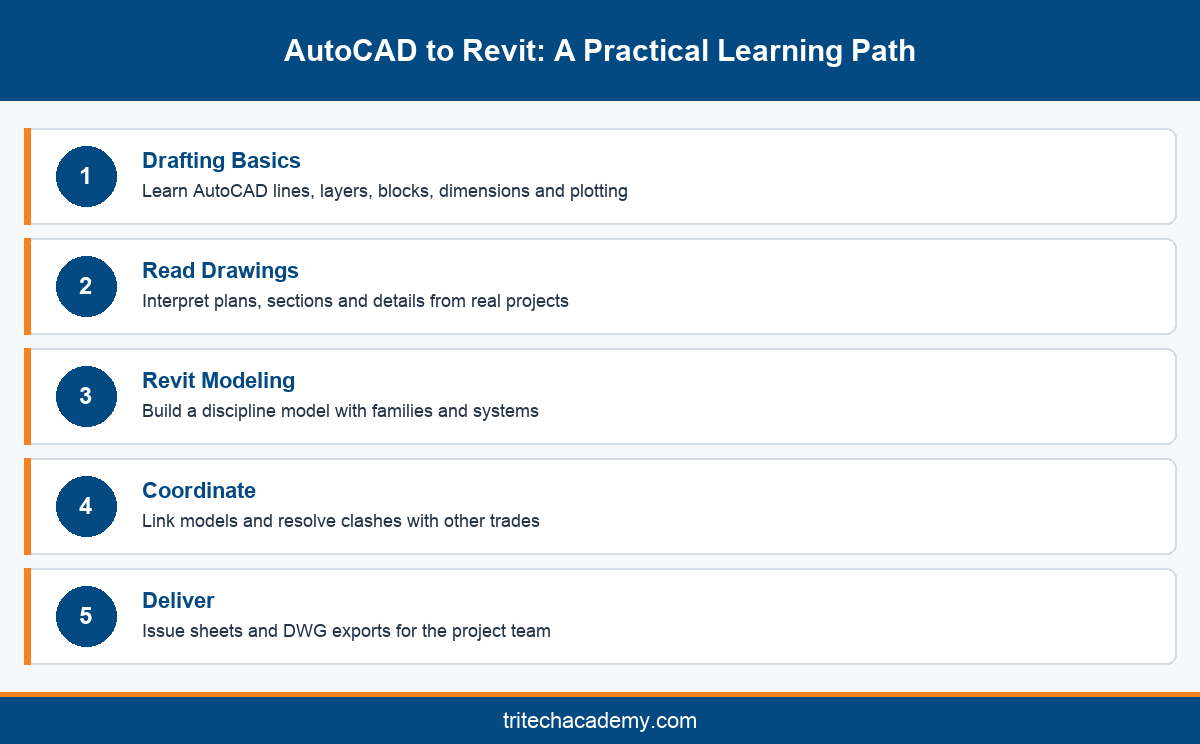
Across all four disciplines, the pattern is similar. Learn enough AutoCAD to read and edit drawings confidently, then invest most of your training time in Revit, because that is where coordinated project work and BIM roles now live.
Choosing AutoCAD and Revit Courses That Teach Both Well
Good AutoCAD and Revit courses treat the tools as one workflow rather than two separate certificates. Students draft a quick layout in AutoCAD, link it into Revit, build the model and then export clean DWG sheets for consultants who still work in 2D.
Ask how the course uses a real project. Exercises built from live drawings teach scale, standards and coordination far better than isolated tutorials. Tritech Academy builds its exercises from projects designed by parent company Tritech Engineering, which has 30+ years of MEP design experience.
Ask who teaches. Faculty who practice in the industry know which shortcuts survive on a live project and which create problems at the coordination stage. That judgement rarely appears in recorded video lessons, however polished they look on screen. A mentor can also point you to the firm standards that local offices actually follow.
Ask about lab access. Revit models grow large, and a student laptop can struggle with linked architecture, structure and services. Training in well equipped computer labs removes that barrier and lets students work on full scale projects from the start.
Finally, ask what you will finish with. Strong AutoCAD Revit training ends with a portfolio: a set of AutoCAD details, a coordinated Revit model and a printed sheet set. AutoCAD Revit classes that end with only screenshots of practice files leave graduates underprepared for interviews.
For the bigger picture of how Revit spreads across disciplines, read our complete guide to Revit training at Tritech, along with the deeper look at Revit for MEP engineers. Together they show how each discipline builds on the same core modeling skills you start with.
What Employers Expect After AutoCAD and Revit Training
Hiring managers in design consultancies rarely ask which tool you learned first. They ask what you can deliver. A candidate who can open a DWG, fix a detail and then update a coordinated Revit model is useful from the first day on the job.
Job titles reflect this mix. Entry roles such as CAD drafter still exist, but listings for BIM modeler, Revit technician and MEP modeler increasingly ask for both tools. Completing an AutoCAD and Revit course together signals that you can fit into either type of team.
Gulf employers deserve a special mention for Kerala students. Many large projects in the Middle East specify BIM deliverables, and engineers from Kochi and Ernakulam regularly move into those roles. Revit fluency, backed by AutoCAD comfort, is a common requirement in such listings, alongside the ability to read older AutoCAD drawings.
Certificates help, but a portfolio decides interviews. Bring printed sheets, a short model walkthrough and a few AutoCAD details you produced yourself. Employers can judge drawing quality in minutes, and that evidence carries more weight than any course completion document.
Tritech Academy has trained 4,500+ engineers and built a global alumni network of 4,000+ professionals. That network matters, because referrals from working alumni often open the first door for new graduates, and the academy’s placement cell helps students prepare for those conversations with mock reviews of their work.
Whichever discipline you study, the safest plan is the same. Start with focused AutoCAD and Revit courses that share one real project, build a portfolio as you go, and choose a training partner with genuine industry practice behind it.
Conclusion
AutoCAD and Revit courses work best as one path rather than a rivalry. AutoCAD gives you drafting precision and the ability to read any drawing; Revit gives you coordinated models, live schedules and access to BIM roles. For most engineering students, the answer is brief AutoCAD fundamentals first, then deep Revit training on a real project. Tritech Academy teaches both that way in Kalamassery, with practicing professionals as faculty. To find the right track for your discipline, contact the admissions team.
Frequently Asked Questions
Are AutoCAD and Revit courses worth taking together?
Yes, for most engineering students. AutoCAD builds drafting precision and drawing literacy, while Revit adds modeling, schedules and coordination. Learning both on one real project shows employers you can work in traditional 2D offices and modern BIM teams alike.
Should I learn AutoCAD before Revit?
A short foundation in AutoCAD helps, especially for reading and editing drawings. You do not need years of AutoCAD experience before Revit. Most students move into Revit after mastering layers, blocks, dimensions and plotting on a few practice drawings.
Is Revit harder to learn than AutoCAD?
Revit asks you to think in building elements rather than lines, which feels harder at first. Once that idea clicks, many tasks become faster than in AutoCAD, because one change updates every view, schedule and sheet automatically.
Which software do civil engineers need most?
Civil engineers in roads and site work still rely on AutoCAD based tools. Those working on buildings increasingly need Revit for structural models and coordination. Learning both keeps your options open across infrastructure and building projects in India and abroad.
Do mechanical engineers need Revit for HVAC jobs?
Increasingly, yes. Most building services consultancies now model ducts, pipes and equipment in Revit and issue drawings from the model. AutoCAD knowledge still helps with schematics and older drawings, but Revit skills carry more weight in HVAC interviews.
Can I learn AutoCAD and Revit online?
You can learn both tools online at a basic level. Classroom training adds instructor feedback, real project drawings and lab machines powerful enough for large linked models, which usually speeds up the move from practice files to professional work.
Is AutoCAD becoming outdated?
No. AutoCAD remains the standard for many 2D tasks, details and drawing exchange. Its role has narrowed on large building projects, where Revit leads, but engineers who can read and edit DWG files will stay useful for years.
What programs does Tritech Academy offer?
Tritech Academy offers programs in BIM for architecture, civil and structures, MEP integrated BIM, HVAC, electrical systems, plumbing and fire safety, plus internships. You can compare them all on the Tritech Academy programs page before choosing a track.
Where can I see Tritech Academy’s training environment?
The academy shares site visits, workshops and classroom sessions in its photo gallery of student activities. Visiting the Kalamassery campus in person is also worthwhile, because you can see the labs and speak with faculty about your discipline.